
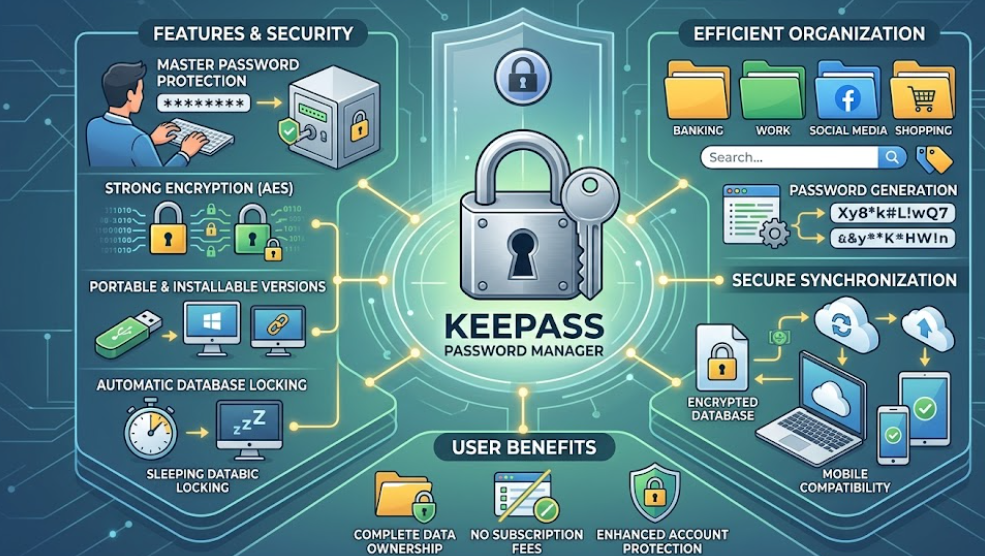
KeePass is a reliable password management application designed for people who want better protection for personal and professional accounts. The software stores usernames, passwords, notes, and confidential details inside encrypted databases that remain secure behind one master password. Many users prefer KeePass because it offers strong security features without forcing expensive subscription fees or complicated cloud integrations.
The installation process is straightforward across Windows, Linux, and macOS systems. Users can download portable or installable versions depending on their preferences. The portable version works well for students and professionals who regularly switch between devices because it can operate directly from a USB drive. Once installed, KeePass guides users through database creation, master password selection, and security configuration.
KeePass supports advanced encryption algorithms that protect sensitive information from unauthorized access. The software also includes automatic locking functions that secure databases whenever systems remain inactive for extended periods. These security settings help reduce risks associated with public computers, shared workstations, or accidental exposure.
Organizing Password Databases Efficiently Using Custom Folder Categories
One of the strongest advantages of KeePass involves its flexible organization system. Users can create folders for banking accounts, educational websites, entertainment services, and workplace platforms. This structure improves accessibility while reducing confusion when managing large collections of credentials.
The search function allows quick access to stored information during busy schedules. Students managing academic portals, employees accessing corporate systems, and freelancers handling multiple client accounts can save considerable time using categorized databases. KeePass also supports tags, notes, and customized fields for additional organization.
Another helpful feature involves password generation tools. KeePass can create strong combinations containing uppercase letters, lowercase letters, numbers, and symbols. These randomly generated passwords reduce vulnerabilities caused by predictable patterns or reused credentials. Since modern cyberattacks frequently target weak passwords, this feature provides important protection.
KeePass also includes clipboard clearing tools that automatically remove copied passwords after short periods. This small but valuable feature helps prevent sensitive information from remaining exposed on shared devices.
Synchronizing KeePass Data Securely Across Personal Electronic Devices
Many users synchronize KeePass databases across laptops, smartphones, and tablets using trusted cloud storage services. Although KeePass itself remains primarily offline, encrypted databases can still be transferred safely through secure synchronization platforms. This flexibility allows users to maintain consistent password access without sacrificing control over sensitive data.
Mobile compatibility expands KeePass functionality significantly. Several companion applications support KeePass database formats on Android and iOS devices. These mobile solutions allow users to retrieve login credentials during travel, classroom activities, or professional meetings.
KeePass remains popular because it balances affordability, customization, and strong security practices. Unlike many online password managers, KeePass gives users complete ownership of their databases and encryption keys. This independence appeals to privacy-conscious individuals who prefer direct control over sensitive information.
For anyone seeking a dependable password management solution, KeePass offers practical features that improve organization, strengthen account protection, and simplify everyday digital activities. Its combination of portability, security, and customization continues attracting users worldwide.
You may like: Dragon Software Revolutionizes Professional Dictation
Source: https://keepass.info/