
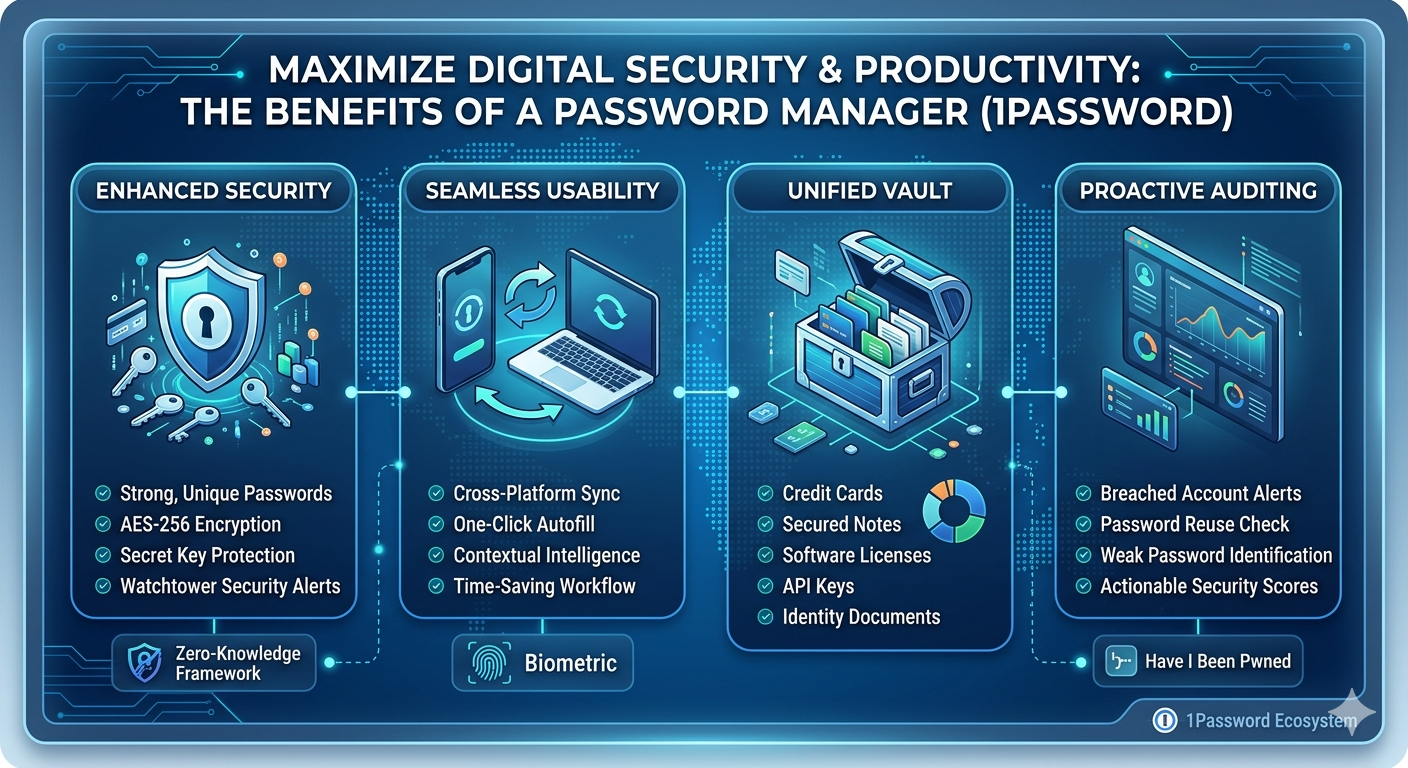
In an era where our professional lives, financial assets, and personal memories are stored entirely in the cloud, security is no longer a luxury—it is a baseline requirement. Yet, the average internet user must juggle over 100 online accounts. This overwhelming volume leads to predictable, dangerous habits: reusing weak passwords, writing credentials down physically, or relying on easily compromised browser storage.
This friction creates an opening for cybercriminals. Standard password management is broken, but professional credential ecosystems offer a solution. As a market leader, 1Password provides far more than a simple digital vault; it is a complete, proactive defense layer that transforms how individuals and organizations manage their digital footprint.
Here are the essential benefits of 1Password, moving beyond simple storage into advanced security, productivity, and architectural resilience.
1. Architectural Security: The Power of the Secret Key
While many password managers rely solely on your Master Password for encryption, 1Password is engineered around a deeper, two-layered security model that provides mathematically verifiable protection.
The Dual-Key System (Master Password + Secret Key)
Standard managers have a single point of failure: if an attacker phishes or guesses your Master Password, your vault is compromised. 1Password introduces the Secret Key, a unique, 128-bit cryptographic key generated locally on your device during setup. This key is never transmitted to 1Password’s servers.
To decrypt your vault, a user must possess both:
- Something you know (your memorized Master Password).
- Something you have (the locally stored Secret Key file).
This defense-in-depth model means that even if 1Password itself were hypothetically breached, the stolen, encrypted data is totally useless to attackers. Without your unique, locally-generated Secret Key, breaking the AES-256 bit encryption is practically impossible.
Zero-Knowledge Architecture
1Password operates on a strict zero-knowledge framework. They have zero visibility into your data, your master password, or your secret key. You retain absolute ownership and control over your encryption keys, guaranteeing total data privacy from the service provider itself.
2. Proactive Threat Intelligence via Watchtower
Passive storage isn’t enough when threats are constantly evolving. 1Password includes an automated security engine called Watchtower, which acts as a real-time analytics and reporting dashboard for your digital vulnerabilities. Watchtower continuously audits your local database against known public breaches and structural security weaknesses.
Breach Monitoring & Integrations
Watchtower checks your stored credentials against verified data breaches (utilizing services like Have I Been Pwned). If a service you use is compromised, Watchtower generates an immediate, high-priority alert, prompting you to change the password before it can be exploited.
Structural Audits
The Watchtower interface identifies structural risks within your vault and provides a color-coded analysis (as seen in the accompanying image) of:
- Compromised Passwords: Credentials found in public breaches.
- Reused Passwords: Highlighting identical credentials used across multiple sites (preventing credential stuffing attacks).
- Weak Passwords: Identifying short, predictable, or easily guessable phrases.
- Unsecured Websites: Alerting you to accounts still using HTTP rather than encrypted HTTPS.
- Missing 2FA: Spotting accounts that support Two-Factor Authentication (2FA) but do not have it activated.
3. Unified Workflow and Ecosystem Integration
Maximizing security usually requires sacrificing usability, but 1Password streamlines the user experience across all digital environments. It removes the friction associated with complex logins, acting as a unified assistant.
Cross-Platform Continuity
Your secure data is instantaneously synced across every device in your ecosystem. 1Password offers native applications for:
- Desktop: macOS, Windows, Linux
- Mobile: iOS, Android
- Web Browsers: Dedicated extensions for Chrome, Firefox, Edge, Brave, and Safari.
If you update a password on your desktop, it is immediately available via biometric authentication (FaceID or fingerprint) on your mobile device.
Intelligent, Context-Aware Autofill
Manually copying and pasting passwords invites clipboard vulnerabilities. 1Password’s browser extensions and mobile apps detect login fields and offer one-click Autofill.
Critically, 1Password verifies the domain before inputting data. If you inadvertently click a sophisticated phishing link designed to look like your bank’s website, 1Password recognizes the underlying URL discrepancy and refuses to fill the credentials, completely neutralizing credential harvesting attempts.
4. Consolidated Vault: Beyond Simple Logins
A professional credential manager is a secure repository for all critical, structured digital data. 1Password offers optimized templates to encrypt and manage a wide range of sensitive information, transforming from a simple tool into a Unified Vault:
- Integrated Multi-Factor Authentication (MFA/TOTP): 1Password acts as a 2FA authenticator app. It stores your 2FA seeds and automatically generates and copies the 6-digit rolling code right next to your password, completely replacing standalone authenticator apps.
- Digital Wallet & Financial Data: Securely stores credit cards, bank account details, and payment profiles for rapid, secure checkout.
- Identity & Documentation: Encrypts scans of passports, driver’s licenses, social security cards, and medical records.
- Secure Notes & Software Keys: Protects sensitive text notes, software license keys, SSH keys, and API tokens.
Conclusion: Digital Peace of Mind
The visual guide summary (Image 1) illustrates how 1Password synthesizes complex cryptographic architecture into four clear, user-centric columns: Enhanced Security, Seamless Usability, Unified Vault, and Proactive Auditing. This integration turns credential management from a daily burden into a seamless, automatic security layer.
By neutralizing the human vulnerabilities that cause over 80% of data breaches—like weak passwords and reused credentials—1Password converts security compliance from a roadblock into a productivity asset. Investing in a professional credential ecosystem isn’t just about protecting passwords; it is about securing your complete digital identity.
Also Read: Comprehensive Troubleshooting Guide: Office 365 SMTP Relay Not Working
Source: Introducing 1Password® Unified Access: Identity Security for Humans and Their AI Agents | 1Password